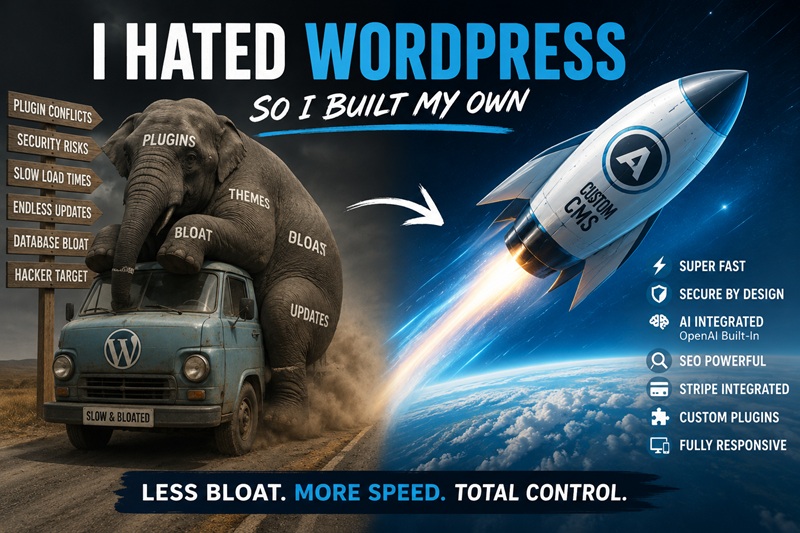
Why I Left WordPress and Built a Custom CMS
I used WordPress for years, but I eventually spent more time maintaining the platform than managing my website. Plugin dependencies, page-builder bloat, performance workarounds, compatibility problems, and ongoing security maintenance turned straightforward changes into recurring technical projects.
WordPress can still be a practical choice for many websites. For AlexanderMirvis.com, however, building a purpose-built custom CMS became more appealing than continuing to expand and maintain a collection of third-party components.
The short version: I wanted a lightweight public site, a clean administration area, direct control over the architecture, and built-in support for publishing, SEO, media, redirects, AI-assisted content, and paid inquiries.
Why WordPress Became a Problem for Me
A clean WordPress installation can be lightweight. The difficulty begins when a site needs SEO controls, redirects, forms, security, caching, image optimization, payments, and other operational features. Each requirement can introduce another plugin, configuration screen, update cycle, and potential compatibility issue.
Eventually, the content management system can become a dependency-management system. That was the point at which WordPress began to feel less like a tool and more like a recurring maintenance obligation.
Plugin dependencies and compatibility
The WordPress plugin ecosystem is both its greatest advantage and one of its largest complications. It makes an enormous range of functionality available, but it can also leave a website dependent on software maintained by unrelated developers.
A WordPress update can affect a plugin. A PHP update can expose another compatibility problem. A theme change can alter a layout. Avoiding updates is not a sustainable answer either, particularly when security fixes are involved.
The recurring question becomes: What will this update break?
Page-builder bloat
Page builders such as Elementor, WPBakery, Divi, Gutenberg-based builders, and theme-specific systems can make visual design easier. They can also produce substantial markup, CSS, JavaScript, wrapper elements, configuration data, and database content for layouts that could otherwise be relatively simple.
I did not want a heading, three paragraphs, and a button to require layers of builder-specific output and configuration.
Performance workarounds
When a WordPress site becomes slow, the usual response is often to add more software: caching, optimization, minification, delayed JavaScript, combined CSS, image processing, or CDN integration. Those tools can help, but they also create additional settings and exceptions when an optimization breaks part of the site.
I reached a point where I was configuring software to compensate for the performance costs introduced by other software. I wanted the public-facing site to remain fast and simple by design.
Ongoing security maintenance
WordPress is widely used, which makes installations a common target for automated attacks. WordPress core, themes, plugins, abandoned components, upload handlers, XML-RPC, administrative accounts, and database access can all require attention.
WordPress can be secured, but the work does not stop after the initial setup. The larger the collection of themes and plugins, the more code and update activity there is to monitor.
What I Built Instead
I built a custom CMS for AlexanderMirvis.com. It is not intended to support every possible kind of website. It is designed around the publishing and administrative functionality this site actually needs.
The system manages:
- Pages and publications
- Categories, subcategories, tags, and navigation
- Media, featured images, and inline images
- Metadata, structured data, sitemaps, and indexing controls
- Friendly URLs and redirects
- Users, permissions, revisions, drafts, and scheduling
- Custom plugins under controlled permissions
- OpenAI-assisted content and SEO workflows
- Stripe payments and paid consulting inquiries
Because I control the architecture, the public site can stay lightweight while the administrative functionality remains behind the CMS.
A fast, simple homepage
The homepage is intentionally designed to remain fast and straightforward. It does not need a page builder to calculate multiple layers of layout configuration whenever someone visits. The CMS manages the content and administration without requiring the public homepage to carry unnecessary builder functionality.
Controlled extensibility
Plugins are not inherently the problem. Losing control of the dependency chain is the problem.
My CMS supports custom plugins where appropriate, but I control the codebase, permissions, and administrative access. Plugin management is restricted to the proper administrative level. AI-assisted content tools are also separated from executable server code, so OpenAI cannot rewrite PHP files or modify the authentication system.
Publishing and Content Management
Page management
Inside the CMS, I can create drafts, publish or schedule pages, make content private, change titles, edit friendly URLs, upload featured images, insert inline media, edit HTML directly, and maintain revision history.
Each page also has its own SEO settings, eliminating the need for a separate plugin just to edit metadata.
Publications with categories and subcategories
Articles are organized in the publications archive. The CMS supports categories and subcategories, allowing a clean structure such as:
/publications/technology/cybersecurity/article-title/Publications support categories, subcategories, tags, excerpts, featured images, publication dates, drafts, private status, scheduled publishing, inline media, revision history, and editable friendly URLs.
If a publication URL changes, the CMS can preserve the previous location with a 301 redirect.
Media library
The built-in media system lets me upload and reuse images, assign featured images, insert media into pages and publications, and provide appropriate alternative text.
I managed to build an image uploader without turning it into a collection of upgrade notices and monthly subscriptions.
Navigation, sidebars, and widgets
Navigation is managed independently from the content hierarchy. I can add, remove, and reorder menu items; link to internal pages or publications; and create external links. The CMS also includes sidebar and widget functionality for reusable site components.
Revisions, scheduling, and publication controls
Revision history, scheduled publishing, draft management, private content, publication dates, categories, subcategories, tags, and featured images are all part of the same system. These are the content-management features I need, without unrelated functionality attached to them.
Built-In SEO and Redirects
One of my main goals was to make SEO part of the CMS architecture rather than something added later through a large plugin.
Every page and publication supports:
- A custom SEO title and meta description
- A focus keyword or keyphrase
- An editable slug and canonical URL
- Index and noindex controls
- Follow and nofollow directives
- Open Graph metadata and social images
- Structured data
- Search-result previews
The CMS also manages friendly URLs, robots.txt, the XML sitemap, and redirects. When a page or publication moves, the system can preserve its previous friendly URL.
OpenAI Integration Inside the CMS
OpenAI is integrated directly into the editorial workflow. I do not need to copy an article into another tool, copy the recommendations back, and then enter the same information into a separate SEO plugin.
Page-level SEO analysis
Each page and publication can run an OpenAI-powered analysis covering search intent, keyword targeting, headings, readability, content depth, metadata, structure, and other optimization opportunities.
Metadata generation
Based on the page content, OpenAI can recommend an SEO title, meta description, focus keyword, excerpt, tags, and friendly URL.
Content improvement
The system can suggest improvements to titles, headings, introductions, paragraph structure, internal organization, keyword targeting, metadata, tags, excerpts, and URLs. Proposed changes can then be applied in the CMS editor.
Natural-language editorial commands
The CMS also includes a general AI command interface. For example, I can request:
Optimize this article for cybersecurity consulting in New York. Improve the introduction, rewrite the H2 headings, create a stronger SEO title and meta description, suggest relevant tags, and improve the URL.
The page content is already available to the CMS, reducing the need to copy and paste between multiple tools.
Site-wide AI SEO analysis
The site-wide AI SEO Center can review the broader content inventory rather than analyzing only one page at a time. It can identify weak titles, missing descriptions, duplicate metadata, thin content, keyword overlap, search-intent conflicts, potential keyword cannibalization, and other optimization opportunities.
This helps surface pages that may be competing with one another and identifies content that deserves priority attention.
Stripe and Paid Inquiries
Stripe is integrated directly into the CMS. Stripe API credentials, pricing, currency, webhook verification, and inquiry status are managed from the administration area.
My current setup can require a $20 payment for a consulting inquiry. The CMS verifies the payment server-side before the message becomes available.
Paid inquiries appear inside the CMS administration system. Unpaid submissions remain locked, while completed Stripe payments are verified before an inquiry is released.
This avoids combining separate contact-form, payment, webhook, and integration plugins for one workflow.
Security and Administration
I wanted security to be designed into the architecture rather than added afterward through another collection of plugins.
The CMS includes:
- Prepared database statements
- CSRF protection
- Secure password hashing
- Controlled sessions
- MIME-validated uploads
- Executable upload blocking
- Protected configuration files
- Environment-based secrets
- Security headers
- Stripe webhook signature verification
- Separation between AI content permissions and executable server code
OpenAI can assist with content, metadata, SEO, and structured CMS actions. It cannot decide at 3:00 in the morning that config.php needs a creative rewrite.
Responsive administration
The administration interface is Bootstrap-based and responsive across desktop, laptop, tablet, and mobile devices. I wanted it to feel like a focused application rather than a dashboard dominated by plugin notifications and upgrade prompts.
Is WordPress Still Useful?
Yes. WordPress remains useful, widely supported, and reasonable for many businesses. It can launch websites quickly, many developers understand it, and plugins are available for nearly every common requirement.
For me, however, maintaining the surrounding ecosystem eventually became more frustrating than building the functionality I needed. I wanted speed, architectural control, clean URLs, structured publications, media management, built-in SEO, redirects, Stripe, controlled plugins, and direct OpenAI integration.
AlexanderMirvis.com now runs on a CMS designed around those requirements, without the WordPress plugin roulette, page-builder overhead, and recurring cycle of installing software to compensate for other software.
And yes, it is fast. A website can move quickly when it is not carrying the digital equivalent of a moving truck everywhere it goes.
Comments
Leave a comment
No account is required. Your email address is required for payment/moderation records but is never displayed publicly. Comments are not eligible for approval until the $5.00 Stripe payment is verified, and payment does not guarantee approval.