I Left WordPress, Opened phpMyAdmin, and Discovered My Old Site Had Been Hacked
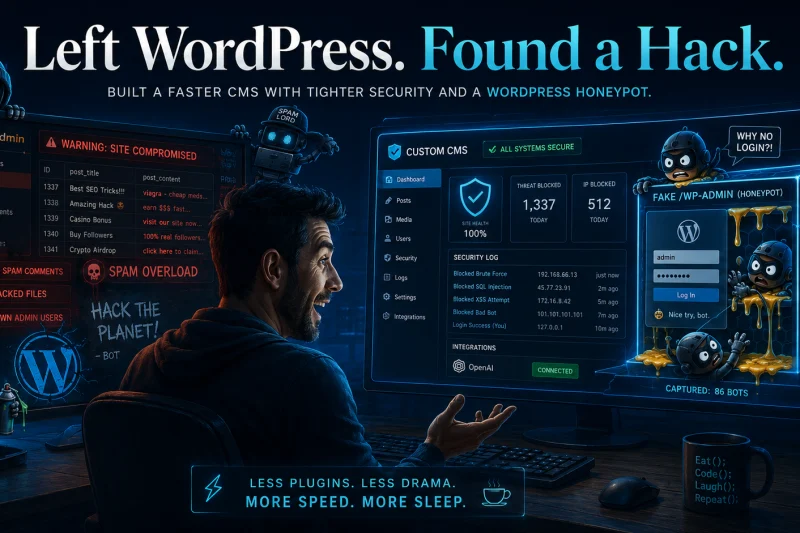
Leaving WordPress was already one of the better technical decisions I had made for my website. I wanted more control over the code, fewer dependencies, better performance, tighter security, direct integration with OpenAI, and a content management system that actually worked around what I needed instead of forcing me to install another plugin every time I wanted to change something.
So I built my own custom CMS and started slowly migrating some of my older articles from WordPress. The process was fairly straightforward. I opened phpMyAdmin, started going through the old WordPress database, located the posts I wanted to preserve, and began cleaning everything up before transferring the content into the new system.
Then I noticed something interesting.
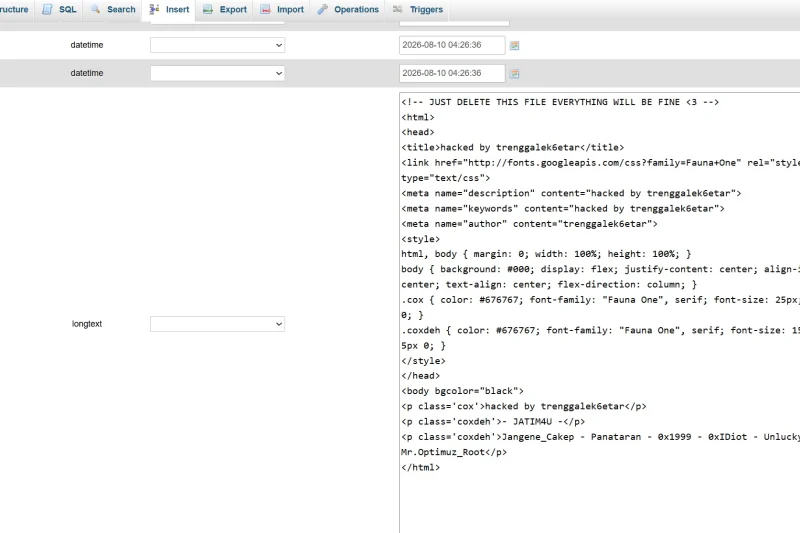
There were database rows that did not belong there. There was useless garbage scattered throughout the database. There were strange entries and posts that I definitely did not remember creating. The more I looked through the database, the more obvious it became that somebody had apparently gotten into the old WordPress installation at some point and decided to redecorate.
Fantastic.
I cannot say with certainty exactly how the old WordPress installation was compromised without doing a complete forensic examination of the server. It could have been SQL injection. It could have been a vulnerable or outdated plugin. It could have been a theme vulnerability, stolen administrator credentials, compromised FTP or hosting credentials, an old PHP backdoor, a malicious upload, exposed database credentials, or some other forgotten component that had been sitting on the server for years.
The important point is that finding garbage records in a database does not automatically prove SQL injection. Anyone who sees strange database rows and immediately screams, "SQL INJECTION!" without examining the server is guessing. There are plenty of ways to compromise a WordPress installation. Unfortunately, WordPress gives attackers a very large menu to choose from when the installation has accumulated enough plugins, themes, users, backups, and forgotten files over the years.
WordPress Was Gone, but the Security Lesson Stayed
My current website does not use WordPress at all. It runs on a custom CMS that I built specifically for my own needs. It manages pages, publications, categories, media, SEO, translations, OpenAI-powered content tools, comments, Stripe payments, administrative functions, custom plugins, security auditing, and the other features I actually use.
Removing WordPress eliminated a huge amount of unnecessary attack surface. There is no giant plugin ecosystem sitting underneath the website. There are no random themes pulling in libraries from ten different developers. There are no forgotten plugins that stopped receiving security updates five years ago. If I want a feature, I know exactly where that feature is implemented and what code is responsible for it.
That does not mean custom software is automatically secure. Custom software can be just as vulnerable, and sometimes considerably worse, if the developer assumes nobody will understand how it works. Security through obscurity is not security. The difference is that with my own CMS, I can review the entire attack surface, remove unnecessary functionality, log suspicious behavior, and change the application architecture when I find something I do not like.
Finding the garbage inside my old WordPress database gave me a good reason to go through the new CMS again with a much more paranoid mindset. In cybersecurity, a reasonable amount of paranoia is basically preventative maintenance.
Starting With the Database
One of the first areas I reviewed was database security. The new CMS uses PDO prepared statements for user-controlled values instead of building SQL queries by concatenating random form fields directly into query strings. That dramatically reduces the traditional SQL injection attack surface.
MySQL multi-statement execution is also disabled for normal application database connections. The database account should only have the permissions the CMS actually needs. A public-facing PHP application does not need to be given unlimited database administrative privileges simply because granting everything is easier.
Convenience and security have never been particularly good roommates.
None of this makes the database magically unhackable. Nothing connected to the Internet should ever be described as unhackable. The goal is to make exploitation substantially harder and to limit what can happen if one defensive layer fails.
I Built a Security Center Because I Want to Know Who Is Knocking
After seeing what happened to the old site, one of the biggest features I wanted in the new CMS was visibility. If somebody is probing my server, repeatedly failing authentication, looking for configuration files, hitting fake WordPress endpoints, abusing forms, or performing suspicious administrative actions, I want a record of it.
The CMS now has a dedicated Security Center that records security-related activity. Depending on the event, it can record the source IP address, date and time, request method, requested path, user agent, authenticated administrator, event category, severity, and how frequently the same activity has been observed.
The security system can track successful and failed administrator logins, authorization failures, suspicious URL probes, rate-limit violations, administrative POST requests, content modifications, Stripe webhook failures, contact and comment activity, and attempts to access the fake WordPress login system.
At the same time, the logger deliberately avoids becoming a treasure chest for an attacker. Passwords are not stored. Cookies are not dumped into the log. Authorization headers, API keys, Stripe secrets, CSRF tokens, and similar credentials are excluded or redacted. There is no point in creating a sophisticated security system and then conveniently storing every secret an attacker would want in one database table.
IP Blocking Is Built Into the CMS
If I see a particularly persistent scanner or someone repeatedly attempting suspicious requests, I can block the individual IPv4 or IPv6 address directly from the Security Center. CIDR ranges can also be blocked when necessary.
The CMS can enforce those blocks at the application level, but it can also generate Apache rules for server-level blocking. That distinction matters. Blocking someone inside PHP means the web application still has to receive and process part of the request. Blocking the address at Apache, a firewall, or the network edge is better because the request can be rejected before the application has to waste resources dealing with it.
If I am throwing someone out of the building, I would rather stop them at the front door than let them ride the elevator upstairs first.
I Do Not Let Visitors Choose Their Own IP Address
Another security issue that is surprisingly common involves headers such as X-Forwarded-For and X-Real-IP. Poorly designed applications sometimes trust those headers automatically and record whatever IP address the client sends.
That is a problem because anyone using Burp Suite, curl, a custom script, or another HTTP client can submit a fake forwarding header. An attacker could send X-Forwarded-For: 8.8.8.8 and suddenly your security system thinks Google is attacking you.
My CMS only trusts forwarded-client-IP headers when the actual connection originates from a proxy address I explicitly configured as trusted. Otherwise, the CMS relies on the actual remote connection address. I am not interested in maintaining a security log where the person being investigated gets to choose what IP address appears next to his activity.
Everybody on the Internet Apparently Wants My .env File
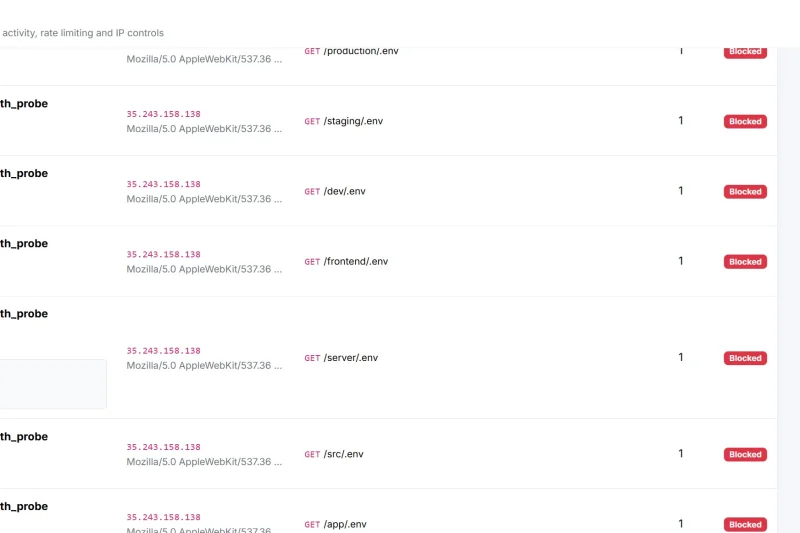
Shortly after I started paying closer attention to the security logs, I noticed something else. Automated scanners absolutely love looking for environment files.
They probe for things like /.env, /.env.production, /.env.local, /.env.backup, /.env.old, /.git/config, /.aws/credentials, /database.sql, /backup.sql, and various configuration and backup files.
Apparently my environment variables are extremely popular. I should start charging admission.
The Apache configuration now rejects hidden files, configuration files, backup files, database dumps, source-control directories, temporary files, log files, and other sensitive resources before the request ever reaches the normal CMS routing system.
The .well-known directory is deliberately excluded from the general hidden-file restriction because legitimate services such as ACME and Let's Encrypt may require access to it. Everything else gets treated with considerably less hospitality.
I also prefer returning a generic 404 for many reconnaissance requests rather than confirming that a protected resource exists. There is no reason to tell an automated scanner, "Congratulations, you found my .env file, but unfortunately I will not let you read it." A simple "nothing here" provides less information.
For an additional layer of protection, production secrets can be stored outside the publicly accessible document root entirely. That way, even if an Apache rule is accidentally changed or a rewrite fails, there is no environment file inside the website directory for the web server to deliver.
Internal Directories Stay Internal
The CMS has internal directories for configuration, includes, database code, storage, plugins, and documentation. Those directories exist because the application needs them. They are not public pages and there is no legitimate reason for somebody on the Internet to browse through them.
Direct web access to sensitive application directories is blocked. Directory indexing is disabled, and unnecessary CGI execution is disabled as well. Static assets and intentionally public applications can still be served normally, but internal source files are treated as internal source files.
I do not need Apache politely generating an index of my application structure for someone doing reconnaissance. If they want a guided tour of my source tree, they can wait for the book.
Security Headers Are Another Layer
The web server also returns a collection of security-oriented HTTP headers. These include protections dealing with content-type sniffing, framing, referrer information, browser permissions, HTTPS enforcement, cross-domain policy behavior, and executable embedded content.
The configuration includes controls such as X-Content-Type-Options, Referrer-Policy, X-Frame-Options, X-Permitted-Cross-Domain-Policies, Permissions-Policy, Strict-Transport-Security, and Content-Security-Policy.
Security headers are not replacements for secure application code. They are simply another defensive layer. Good security usually comes from stacking multiple reasonable controls instead of installing one magic feature and declaring victory.
Administrative Sessions Got Tightened
The administrator authentication system also received a serious security pass. New administrator passwords have stronger minimum requirements, and password hashes use modern algorithms such as Argon2id when the PHP environment supports them. Older compatible hashes can be upgraded after successful authentication.
Login attempts are throttled so somebody cannot hammer the login form indefinitely without consequences. Authentication failures use generic responses instead of revealing whether a username or email address actually exists. Session identifiers are regenerated at important authentication boundaries, and administrative sessions have both inactivity limits and absolute expiration periods.
Session cookies use appropriate Secure, HttpOnly, and SameSite settings. Strict session behavior is enabled, and additional session characteristics can be validated to make stolen-session reuse more difficult.
I am still realistic about it. If somebody steals the actual hosting account, database credentials, or server-level access, application session security is no longer the biggest problem in my life. Security has layers, and each layer protects against a different class of failure.
The Installer Is Not Supposed to Become an Attack Surface
During the security audit, I also found something in my own CMS that I did not particularly like. The installer previously had an emergency mechanism intended to help recover from incomplete installations.
That might be convenient while developing software. It becomes considerably less attractive once the website is running in production.
The forced installation bypass was removed. Once the CMS contains real production content, the installer is locked. If I genuinely need to recover an incomplete installation, I have to explicitly enable the recovery function through server configuration.
I would rather inconvenience myself for thirty seconds than leave an installer pathway sitting on a public server for the next ten years.
The PHP Plugin Editor Is Normally Disabled
My CMS has its own custom plugin system. That is useful because I can extend functionality without turning the core application into spaghetti. It also means the CMS can potentially contain functionality capable of modifying PHP code.
Anything capable of modifying executable server-side code deserves additional protection. The production plugin editor is therefore disabled under normal operating conditions. If I intentionally need to edit plugin code, I can enable it at the server level, perform the work as a super administrator, and disable it again immediately afterward.
The same general rule applies to trusted administrative fields capable of storing unrestricted HTML or JavaScript. Those functions are restricted to highly privileged users because, from a security perspective, the ability to inject executable JavaScript into a website is not exactly the same thing as changing the color of a button.
Uploaded Images Are Treated Like Strangers
File uploads received additional security controls as well. The CMS does not blindly believe a browser simply because the browser says a file is an image. The actual contents are inspected and validated.
Uploaded publication images are decoded and re-encoded into fresh WebP files. They are standardized to the dimensions used by the CMS, and the process helps remove unnecessary embedded baggage from the original file. The application also validates file extensions, actual MIME information, image dimensions, file size, and potential decompression-related problems.
Executable file extensions are rejected, and upload directories are configured to prevent uploaded files from suddenly deciding they would rather become PHP applications.
If somebody uploads a file named totally-not-a-webshell.php, I prefer the server not to respond, "Looks like a family photograph to me."
Rate Limiting Prevents Database Garbage Without Any Hacking at All
The compromised WordPress database also made me think about something that technically does not require an exploit at all. A legitimate public feature can sometimes be abused enough to create the same practical result as an attack.
My website has paid contact and commenting functionality. In order to send someone to Stripe Checkout, the CMS may need to create a temporary pending record before payment is completed. Without controls, a bot could repeatedly start the process thousands of times, never pay anything, and slowly fill the database with useless pending records.
Those endpoints are now rate-limited. Abandoned unpaid contact and comment records are also automatically cleaned up after a defined period. The rate-limit system uses compact counters rather than creating an enormous security-log entry for every ordinary request.
Not every attack requires a sophisticated exploit. Sometimes someone can simply press a perfectly legitimate button ten thousand times and turn your database into a landfill.
Administrative Actions Use CSRF Protection
Administrative changes are also protected against cross-site request forgery. Simply being logged into the CMS should not allow another website to trick the browser into submitting an administrative action behind the user's back.
Sensitive administrative requests require proper validation and CSRF protections, while important administrative actions can be written into the security audit log. That gives me a history of what was changed, when it happened, which account performed the action, and where the request originated.
Logging may seem excessive when there is only one primary administrator. It becomes considerably less excessive when something changes and you are staring at the screen thinking, "I absolutely did not do that."
Then I Built the Most Entertaining Security Feature: Fake WordPress
This is probably my favorite part of the entire security system.
My website does not run WordPress anymore. There is absolutely no legitimate reason for an ordinary visitor to request /wp-admin or /wp-login.php. Normal readers do not wake up in the morning and accidentally type /wp-admin after my domain name.
Bots, on the other hand, absolutely love those URLs.
So instead of simply returning a boring error page, I built them a little surprise.
If someone visits /wp-admin or /wp-login.php, the CMS serves a fake WordPress login screen. It looks enough like WordPress to satisfy automated probes and curious visitors, but there is no actual WordPress installation behind it.
They can enter a username. They can enter a password. They can click Log In. They can stare at it. They can try again. They can question their life decisions. The page continues being completely useless to them while the Security Center quietly records the interesting parts of the attempt.
The honeypot records things such as the IP address, timestamp, requested endpoint, user agent, hit count, and attempted username. It intentionally does not store the submitted password. I do not need anyone's password. I only need to know that an IP address spent twenty minutes attempting to authenticate to a WordPress installation that does not exist.
It is basically a digital door painted onto a brick wall.
The WordPress Honeypot Is More Than a Joke
The honeypot is funny, but it also produces a useful security signal. Because the website does not actually use WordPress, requests for WordPress-specific resources immediately become interesting.
If someone starts requesting /wp-admin, /wp-login.php, /wp-config.php, or /xmlrpc.php, I already know that visitor is probably not reading one of my articles. The request may simply be part of an automated Internet-wide vulnerability scan, but it may also be reconnaissance against the specific site.
Either way, the visitor has conveniently identified himself as something worth recording.
There is something satisfying about a scanner trying to fingerprint WordPress while the actual CMS quietly watches from behind the curtain.
WordPress Itself Was Not Necessarily the Culprit
I should make one thing clear. I cannot definitively say that WordPress itself caused the compromise. WordPress powers an enormous part of the Internet and can absolutely be secured when it is properly maintained.
The bigger problem is often what grows around WordPress over time. A mature installation may contain WordPress core, a custom theme, twenty or thirty plugins, administrator accounts nobody remembers creating, backup archives, caching systems, migration tools, abandoned plugins, old PHP files, database utilities, and miscellaneous code accumulated over many years.
Every one of those components becomes another thing that must be trusted, patched, monitored, and eventually removed.
My preference was to simplify the problem. I wanted to know exactly what software was running my website. If something behaves strangely now, I do not have to wonder whether the culprit is WordPress, a theme, Elementor, WooCommerce, Plugin Number 47, Plugin Number 47's compatibility extension, or some plugin developed by a guy who disappeared from the Internet in 2018.
I know where the routes are. I know where the SQL queries are. I know where authentication happens. I know where files are uploaded. I know which endpoints accept POST requests. I know how my Stripe integration works. I know where OpenAI requests originate. I know which directories should never be public.
That kind of visibility is difficult to put a price on.
Security Is Never Finished
The most important thing I took away from discovering the old WordPress compromise is that security is not something you install once and forget about. There is no checkbox that says "Secure Website: Yes."
Security logs need to be reviewed. Software needs to be updated. Credentials occasionally need to be rotated. File permissions need to be checked. Unexpected database activity needs to be investigated. Backups need to exist, but preferably not as /backup.zip sitting inside the public website waiting for a scanner to discover it.
Old files need to be deleted. Development tools need to be disabled in production. Administrators need strong authentication. Uploads need validation. Database queries need parameterization. Sensitive directories need to be protected. Suspicious requests need to be visible.
And if somebody wants to spend an evening trying to brute-force a fake WordPress installation on a website that does not actually run WordPress, sometimes you just have to admire the dedication.
Why I Am Still Glad I Left WordPress
I originally left WordPress because I wanted a faster, cleaner, more controllable website. I wanted a CMS built around my own publishing workflow instead of spending my time installing plugins to work around other plugins.
Discovering that the old installation had apparently been compromised simply gave me another reason to continue in that direction.
My current CMS is not invincible. Nothing exposed to the Internet is. The difference is that now I control the application. I control the database layer. I control authentication. I control the upload pipeline. I control the routing. I control the security logs. I control which administrative functions exist and when they are enabled.
Most importantly, I can actually see when somebody is rattling the doors.
And if those scanners desperately insist on finding WordPress?
Fine.
I left them one.
Sort of.
Comments
Leave a comment
No account is required. Your email address is required for payment/moderation records but is never displayed publicly. Comments are not eligible for approval until the $5.00 Stripe payment is verified, and payment does not guarantee approval.